Guide
Everything you need to know about building playlists with SpinMixPro.
Getting Started
What is SpinMixPro
SpinMixPro is a playlist generator designed for fitness instructors and anyone who wants perfectly structured workout playlists. Instead of manually curating 45-minute playlists, you define a blueprint — an ordered sequence of blocks like Warmup, Jog, Power, and Double — and the engine assembles a playlist from a shared database of BPM-verified songs. Whether you teach spinning, cycling, HIIT, or any rhythm-based class, SpinMixPro handles the music so you can focus on coaching.
Every playlist is duration-accurate (targeting your preferred class length), BPM-matched to each block, and optionally harmonically mixed using the Camelot wheel system.
Sign up and onboarding
Create an account with your email address. During onboarding, you'll be asked to select your preferred genres and add a few favourite artists. This helps the engine personalize your playlists from the very first generation.
Your first playlist generation
- 1Go to the Generator page from the sidebar.
- 2Select a blueprint (a default one is provided).
- 3Click "Generate Playlist" and wait a few seconds.
- 4Review the generated playlist — each song shows title, artist, BPM, and key.
- 5Accept the playlist to save it, or dismiss to try again.
Quick Playlist
Quick Playlist is the fastest way to generate a class playlist. No blueprints, no BPM ranges, no slot types — just pick your genre, duration and energy level, and the engine does the rest. Available to all users (free and Pro).
When to use Quick Playlist vs Advanced
Use Quick Playlist when you want a good class playlist with minimal effort — perfect for trying new genres, filling in for another instructor, or when you just need music fast.
Use Advanced Playlist (blueprint-based) when you want full control over the class structure — specific blocks per slot, precise BPM ranges, variable segments, and harmonic mixing.
How to use it
- 1Go to the Generator page and select the Quick Playlist card.
- 2Pick one or more genres (parent-level only).
- 3Choose your class duration: 30, 45, or 60 minutes.
- 4Select an energy level: Low, Medium, or High.
- 5Hit Generate Playlist. Done!
What the energy levels mean
Low (BPM 80–115): Flat energy curve. Great for yoga, stretch, and cooldown sessions.
Medium (BPM 110–130): Gentle energy build. Suited for Pilates, moderate HIIT, and dance classes.
High (BPM 125–150): Build → peak → recover arc. Designed for intense HIIT, bootcamp, and indoor cycling.
Your favourite artists, excluded artists, and genre preferences from Settings still apply in Quick Playlist mode. The longer you use SpinMixPro, the better your Quick Playlists get automatically.
Blueprints
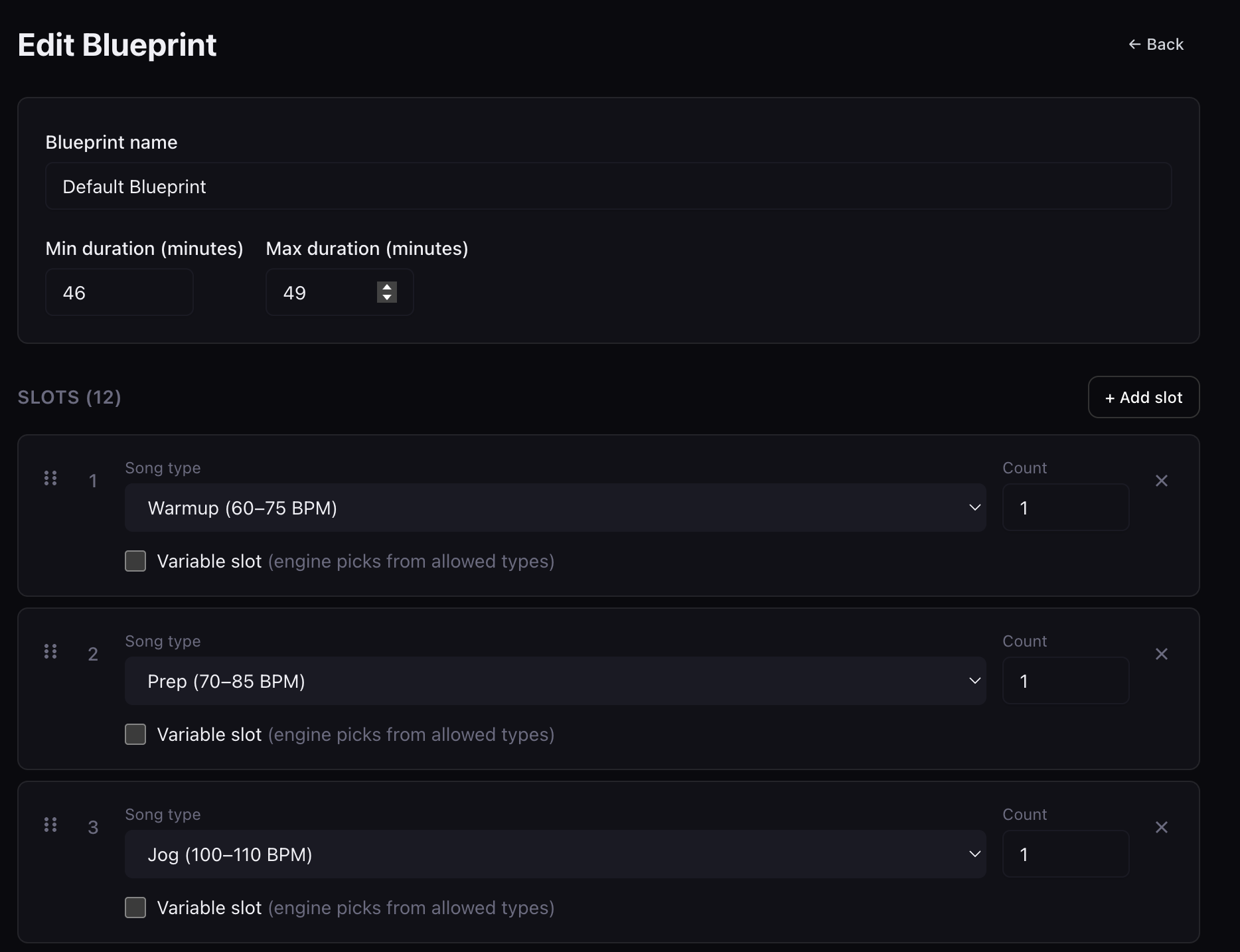
What is a blueprint
A blueprint is an ordered sequence of block "slots" that defines the structure of your class. Each slot specifies what kind of song goes in that position — Warmup first, then build through Jog and Power, then cool down with Lost.
The default blueprint
The default blueprint follows a proven fitness class structure:
The blueprint builds intensity gradually, peaks in the middle with Power segments, and winds down through Weight and Lost.
Creating and editing blueprints
Go to the Blueprints page to create a new blueprint or edit your existing one. You can add, remove, and reorder slots by dragging them. Each slot can be assigned a specific block, or marked as "variable" to allow multiple blocks in that position.
Per-blueprint preferences
Each blueprint has its own generation preferences, so different class styles can use different settings:
- Target duration — min/max playlist length in minutes
- Max mainstream songs — cap on well-known tracks per playlist
- Prefer remixes & edits — 5% scoring bonus for remixed versions
- Include mainstream songs — toggle mainstream on/off (Pro)
- Camelot harmonic mixing — enable key-compatible transitions (Pro)
For example, a high-energy 30-minute HIIT blueprint could allow more mainstream songs and skip harmonic mixing, while a 50-minute deep-cycling blueprint could use harmonic mixing with zero mainstream.
Free users can save 1 blueprint. Pro users can save unlimited blueprints for different class styles.
Blocks
What each block means
Blocks define the energy level and BPM range for each segment of your class. The BPM range tells the engine what tempo to look for when filling that slot.
| Block | BPM Range | 2x | ½x | Description |
|---|---|---|---|---|
| Warmup | 60–75 (120–150 dt) | Gentle start, light pedaling. Sets the mood. | ||
| Prep | 70–85 (140–170 dt) | Building energy. Slightly faster than warmup. | ||
| Easy Jog | 85–100 (170–200 dt) | Comfortable steady-state cycling. | ||
| Jog | 100–110 | Main cardio zone. Moderate effort. | ||
| Fix | 60–80 (120–160 dt) | Recovery between high-intensity efforts. | ||
| Power | 100–150 | High intensity. Standing climbs, sprints. | ||
| Double | 110–135 | Extended high-energy segment. Peak effort zone. | ||
| Super Double | 130–140 | Maximum intensity. The climax of the ride. | ||
| Weight | 120–160 (60–80 ht) | Heavy resistance, slow cadence. Seated climb. | ||
| Lost | 120–150 (60–75 ht) | Emotional recovery. Introspective moment before the finale. | ||
| Finale | 120–140 | Triumphant last push. Celebratory, hands-in-the-air energy. | ||
| Cooldown | 60–90 | Gentle finish. Stretching, breathing. |
Half-time and double-time
Some blocks support half-time (BPM ÷ 2) or double-time (BPM × 2) matching. This is about cycling cadence, not musical tempo:
Double-time: A 60 BPM song played at double-time means pedaling at 120 RPM. Used for warm-up types where you want a slow song but fast legs.
Half-time: A 140 BPM song played at half-time means pedaling at 70 RPM. Used for Weight and Lost where you want heavy resistance with slow cadence.
All BPM variants are clamped to the practical range of 50–200 BPM.
Creating custom blocks
Go to Blocks to create your own blocks with custom BPM ranges, duration limits, and genre preferences. Free users can create up to 3 custom blocks; Pro users get unlimited.
Genre Preferences
Two-level genre selector
In Settings → Music Preferences, genres are organised in a two-level hierarchy. You can select a broad parent genre (e.g. House, Techno, Pop) to match all songs in that category, or expand the parent to pick specific sub-genres (e.g. Tech House, Afro House, Deep House under House). Mix and match freely — select some parents broadly and drill into sub-genres for others.
How genres affect generation
Genre matching accounts for 25% of each song's scoring weight. Selecting a sub-genre gives a stronger match: if a song's sub-genre exactly matches one of your selected sub-genres it receives the full genre score. If only the parent genre matches, the song gets a partial score (50% of the genre weight). Songs from a completely different genre family (e.g. Dubstep when you selected House) get a 0.3× penalty. The engine also uses mood-cluster vibe matching to ensure songs fit the slot's feel — not just the genre.
What happens with no genres selected
If you don't select any genres, the engine falls back to popularity-based selection — the most popular songs in the right BPM range will be picked. Selecting genres significantly improves playlist quality.
Favourite & Excluded Artists

Adding favourite artists
In Settings, search for artists from the database using autocomplete. The search splits multi-artist entries (e.g. "Swedish House Mafia;The Weeknd") into individual names, so you see each artist separately — not the full collaboration string.
How favourites influence generation
Songs by your favourite artists get a 1.3× scoring boost during generation. With a 35% chance per slot, the engine will also force-pick the highest-scoring favourite — ensuring your artists appear regularly. Collaboration tracks match too: if "The Weeknd" is a favourite, a song by "Swedish House Mafia;The Weeknd" also gets the boost. The engine automatically adds your favourite artists' genres to your genre selection during onboarding.
Excluding artists
Add artists to your exclusion list to ensure they never appear in your playlists. Exclusions also apply to collaborations — excluding "Avicii" blocks "David Guetta;Avicii" as well. Useful for artists whose style doesn't fit your class vibe.
Mainstream Policy
What counts as mainstream
Songs with a popularity score of 70 or higher (on a 0–100 scale from streaming platforms) are tagged as "mainstream." These are well-known tracks your class will recognize.
Setting the limit
In the Blueprint editor, you can set the maximum number of mainstream songs per playlist (default: 2). This helps balance familiar crowd-pleasers with underground discoveries. The engine enforces this limit as a hard cap — once reached, only non-mainstream songs are selected. Each blueprint can have its own mainstream limit.
The mainstream tag
In your playlist view, mainstream songs are visually tagged with an orange "mainstream" badge so you can see the mix at a glance.
Remix Preference
What "Prefer remixes" does
When enabled (the default), songs with "Remix," "Edit," "Mix," "Rework," "Bootleg," or "VIP" in the title get a 5% scoring bonus. This nudges the engine toward remixed versions, which often have better energy for fitness classes.
When to turn it off
If you prefer original versions or your class complains about hearing too many remixes, toggle this off in the Blueprint editor. The 5% bonus is removed and originals compete equally. Each blueprint can have its own remix preference.
Playlist Duration
Setting your target duration
In the Blueprint editor, set a minimum and maximum playlist duration (default: 46–49 minutes). This should match your class length minus a few minutes for verbal cues and transitions. Each blueprint can have its own target duration, so a 30-minute express class and a 50-minute endurance class can coexist.
How the engine hits the target
The engine tracks cumulative duration as it fills each slot. When approaching the maximum, it considers song durations more carefully, potentially picking shorter songs for the final slots. If the duration falls short, the blueprint's variable slots can be expanded.
If your playlists consistently run too long or short, adjust the per-block duration limits in Blocks, or tweak your blueprint's slot count.
Harmonic Mixing (Camelot Wheel)
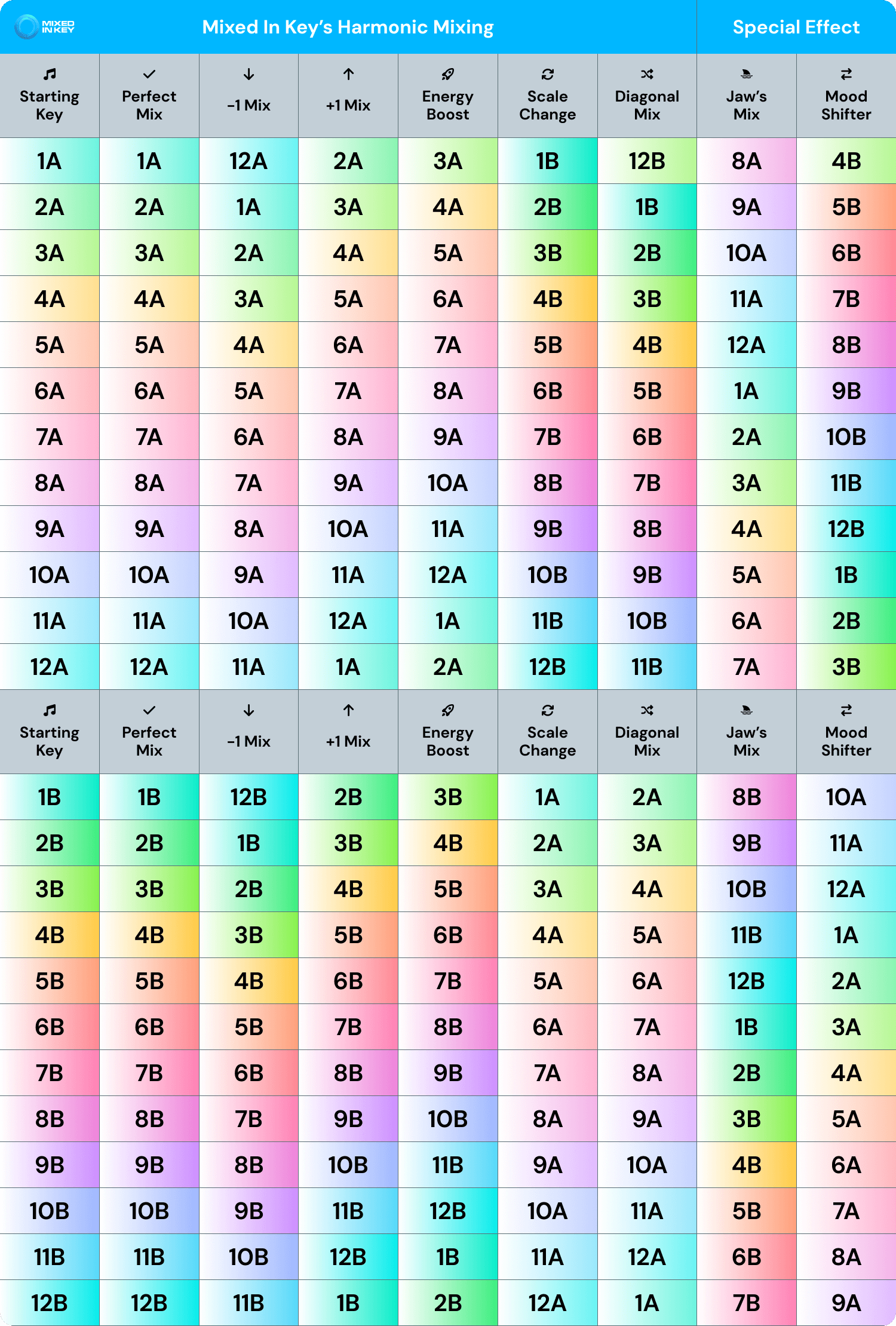
What is harmonic mixing
Harmonic mixing means selecting songs whose musical keys are compatible, so transitions between tracks sound smooth rather than clashing. It's the same principle DJs use when beatmatching — matching keys creates a seamless flow.
The Camelot wheel
The Camelot wheel maps all 24 musical keys to a numbered system (1A through 12B). Compatible keys are:
- Same key — e.g. 8A to 8A
- Adjacent number — e.g. 8A to 7A or 9A
- Scale switch — e.g. 8A to 8B (minor to major)
- Energy boost — +2 steps for building intensity
How SpinMixPro uses it
When harmonic mixing is enabled in the Blueprint editor (Pro feature), the engine applies a fallback chain for each consecutive song: first tries compatible keys, then energy boost keys, then diagonal keys, and finally relaxes the constraint entirely rather than leaving a slot empty. You can enable or disable harmonic mixing per blueprint.
Harmonic mixing is a Pro feature. Free users get BPM and genre matching only. The key column is shown in all playlists regardless of plan.
Reviewing Playlists
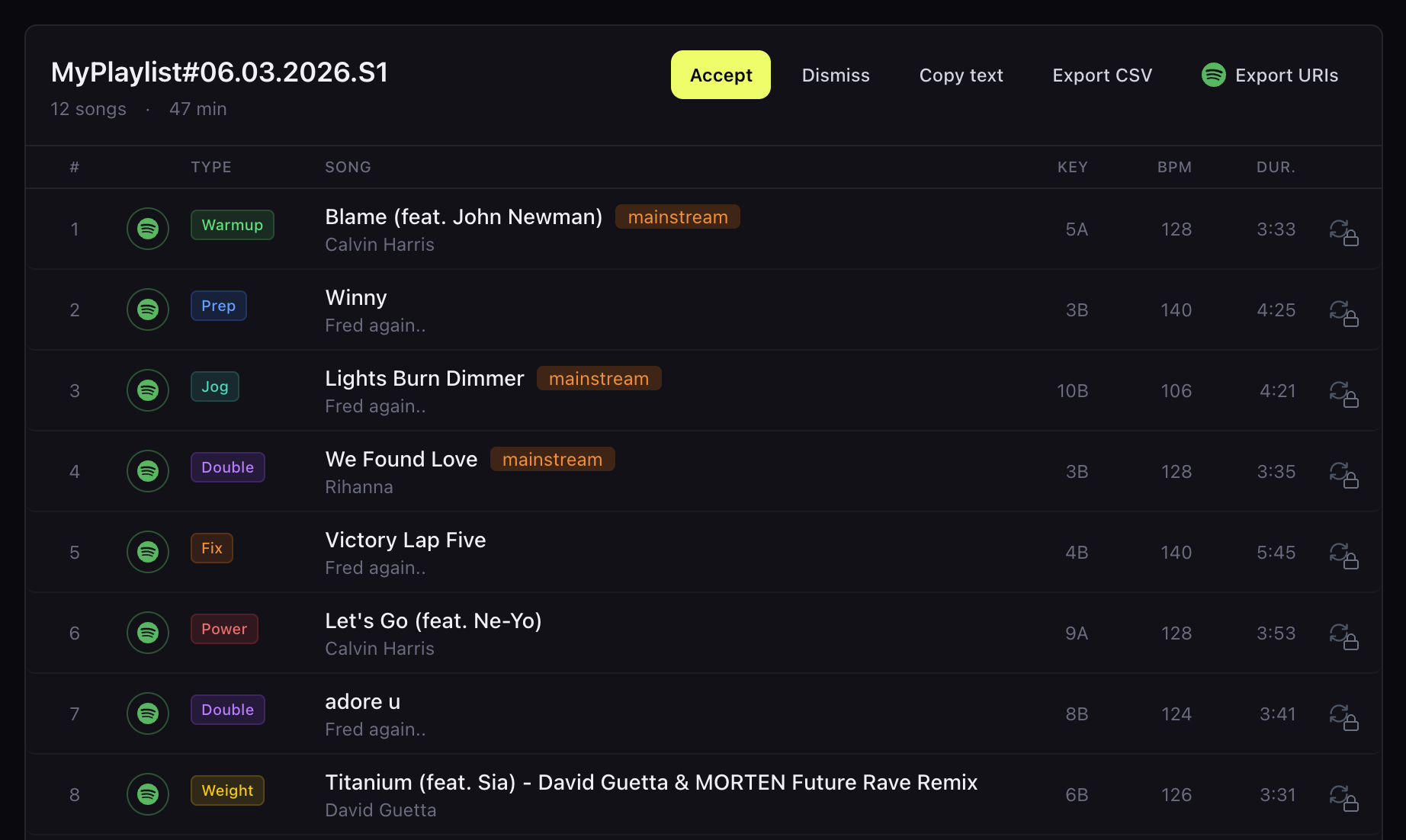
Accept, Dismiss, or Regenerate
After generating a playlist, review it on the playlist detail page. Each song shows its title, artist, BPM, Camelot key, and whether the transition is harmonically compatible.
- Accept — saves the playlist to your history and teaches the engine your taste. The more playlists you accept, the better your future results.
- Dismiss — discards the playlist. It is not saved and does not affect your taste profile.
- Regenerate (Pro only) — generates a fresh playlist using the same blueprint without using an additional credit. Regenerate as many times as you like within a session until you're happy with the result.
Free users get 3 generations per month with no regeneration. Pro users get unlimited generations and unlimited regenerations within each session.
Swap a song (Pro feature)
Don't like one song but the rest is perfect? Pro users can click the swap icon on any song row to replace it with another song that fits the same slot requirements (BPM range, genre, duration, key compatibility). The rest of the playlist stays intact.
How swapping maintains duration
When you swap a song, the engine looks for a replacement within a similar duration range so the total playlist length stays within your target. If the replacement is slightly shorter or longer, the total duration updates accordingly.
Exporting Your Playlist

Copy as text
Click "Copy as Text" to copy a formatted tracklist to your clipboard. Each line shows:
Artist — Title — 128 BPM — 8APaste it into your class notes, a document, or share it with other instructors.
Export as CSV
Download a CSV file with all track data including BPM, key, duration, and Spotify URI. Useful for keeping records or importing into other tools.
Export to Spotify
The fastest way to get your playlist into Spotify:
- 1Click "Export URIs" to copy all Spotify track URIs to your clipboard.
- 2Open the Spotify Desktop app (not the web player).
- 3Create a new playlist in Spotify.
- 4Click inside the playlist and paste (Cmd+V on Mac, Ctrl+V on Windows).
- 5All songs are added instantly — done!
The Spotify paste feature only works in the Desktop app, not the web player or mobile app. Songs without a Spotify URI will be skipped.
Importing Your Library
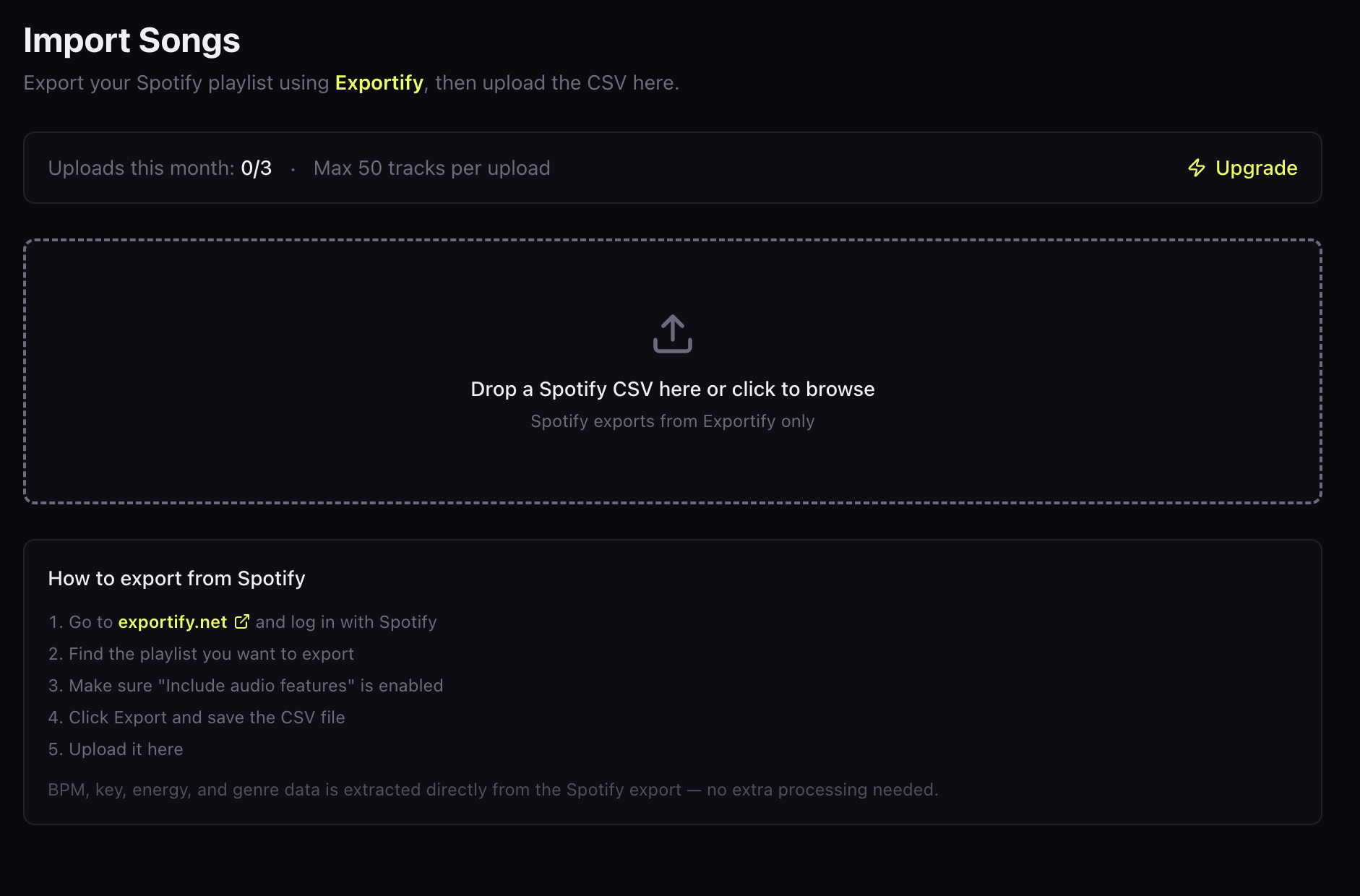
Why importing improves your results
Importing your existing Spotify library adds those songs to the shared database and teaches SpinMixPro your taste. The engine learns your preferred genres, BPM ranges, energy levels, and favourite artists — making future playlists significantly better.
How to export from Spotify
- 1Go to exportify.net in your browser.
- 2Log in with your Spotify account.
- 3Select the playlist(s) you want to export.
- 4Click "Export" to download a CSV file.
- 5The CSV contains track name, artist, BPM (tempo), key, duration, energy, danceability, and more.
Uploading the CSV
Go to the Import page in SpinMixPro and upload your Spotify CSV files. You can select multiple files at once — they'll be processed sequentially with per-file progress. The importer parses each file, extracts BPM and key data directly (no additional verification needed), and adds new songs to the database. Your taste profile and personal library are updated automatically.
What data is imported
From each Spotify CSV row, SpinMixPro extracts: title, artist, BPM (tempo), musical key, duration, energy (0–1), danceability (0–1), popularity, and Spotify URI. BPM and key come directly from Spotify's audio analysis — no additional verification pipeline needed.
All users: unlimited uploads, 500 tracks per upload.
Complete My Playlist
Complete My Playlist is a Pro feature that lets you bring your own songs as fixed slots in a playlist, and the engine fills the remaining gaps to match your blueprint.
How it works
- 1Select a blueprint to define the session structure (blocks, order, duration).
- 2Upload a Spotify CSV containing the songs you want to lock into specific slots.
- 3The engine maps your songs to matching slot types based on BPM, genre, and energy.
- 4Review the result: locked slots show your chosen songs, empty slots are filled by the engine.
- 5Accept the playlist or adjust and regenerate.
When to use it
Use Complete My Playlist when you already have a few tracks in mind for your class — for example, a specific warm-up song or a power track you love — and want the engine to build the rest around them. Your locked songs stay exactly where they are.
Complete My Playlist is a Pro-only feature. Free users can use the standard Generator which builds an entire playlist from scratch.
Personal Library Mode
By default, SpinMixPro generates playlists from the entire shared song database (23,000+ songs). Personal Library Mode restricts generation to only songs you've imported via CSV — guaranteeing every track in the playlist is one you know and own.
How to use it
On the Generator page, toggle "Use my library only" below the blueprint selector. The toggle shows your library song count. When enabled, the engine only considers songs you've imported — no surprises from the shared database.
Coverage check
If your library doesn't have enough songs for a particular slot (e.g. no songs in the Cooldown BPM range), the engine will skip that slot and show a warning. It never silently falls back to the full database — your "library only" choice is always respected.
Smart playlist quality
Even in library mode, the engine applies all its intelligence: genre matching, energy curve scoring, favourite artist boosting, DJ flow transitions, and AI review. The only difference is the song pool is limited to your imports. Original and remix versions of the same song won't both appear in the same playlist.
Personal Library Mode is available to all users (free and pro). Import more playlists via CSV to grow your library and improve results.
Free vs Pro
SpinMixPro is free to use with basic features. Upgrade to Pro for the full experience.
| Feature | Free | Pro |
|---|---|---|
| Quick Playlist mode | ||
| Generations per month | 3 | Unlimited |
| Regenerate playlist (same session) | Unlimited | |
| Harmonic mixing (Camelot) | ||
| Swap individual songs | ||
| Complete My Playlist | ||
| Custom blocks | 3 max | Unlimited |
| Block editing | Name + BPM | Full (vibe, genre, duration) |
| Saved blueprints | 1 | Unlimited |
| Favourite artists | Unlimited | Unlimited |
| CSV imports | Unlimited (500 tracks) | Unlimited (500 tracks) |
| Playlist history | Last 5 | Unlimited |
| Genre filter per block | ||
| Mainstream toggle (on/off) | ||
| Mainstream indicators | ||
| Spotify search link | ||
| Export as text / CSV |
Pro is available for CHF 9/month or CHF 89/year (save 17%). You can upgrade any time from Settings or by clicking "Upgrade to Pro" in the sidebar.